Browser Hijackers Arrested

Chalk one up for the good guys.

Operation Ghost Click is being hailed by the FBI as the “biggest cybercriminal takedown in history.” A group of scumbags in Estonia using malicious software (or malware) called DNS Changer were arrested. They supposedly had control of more than four million computers worldwide!

The DNS Changer, as the name suggests, redirects the domain name system server settings on a computer to those of a bogus server. So your search in Google returns valid results, but when you click on Pepsi.com you get Perestroika.

Oh, and it’s a real PITA to uninstall.

The scammers made money by redirecting the Web browsers of infected computers, then hijacking revenue clicks and replacing legitimate advertisements with their own. American authorities estimate that the criminal take was over $14 million, all of it from online advertisers and publishers.

The company name used by the gang was Rove Digital, which was also one of the early investors in ChronoPay, a Russian payment processor whose principal founder is also in prison currently on cybercriminal charges.

Blogger Navbar Peel

Blogger vs. Word Press: Take 3

In my quest to compare free blogging platforms I turned my attention to the Blogger navbar.

Word Press doesn’t force you to view a navigation bar above your free blog. Although you will see a bar up there if you’re logged into Word Press, this is tied to your user account- not the blog.

Blogger,  on the other hand, displays a bar across all blogs.

While this bar may have a link or two we could consider useful, it seems to be more suited to Google’s purposes than ours. Report abuse? Next blog? No thanks. Plus, this casts the stink of cheap on your otherwise professional-looking blog. It’s really pretty useless to your visitors.

But when I decided to try removing it I found it difficult. Blogger offers you various color options- but “none” was not listed. When I hunted for a way to nix it I found tons of references for the ealier Blogger Templates interface and nothing for the newer style known as Layouts. But I kept searching!

I finally found an excellent tutorial with screenshots from the Webaholic…

Remove Blogger Navbar

This applies to the current Blogger interface and provides step-by-step instructions with pictures. A few clicks and a control+V later I was living life navbar-free. Ahhhh.

Awesome Little Drive

I was in need of more storage for my video files and shopped around for a new external hard drive.  My current drive was a 500 gig Smart Drive that had been very reliable. I was planning on buying another one when I came across a great deal on the Western Digital My Passport Essential SE Ultra Portable.

This is a tiny unit that uses a 2.5″ laptop hard drive.My Passport 1 tb Drive It supports the faster USB 3.0 so it’s wicked fast (but works fine on the older 2.0 interface ). But the best part is there is no power cord. The special cable handles the data transfer AND power needs. No AC outlet needed!

I’ve been using it now for about a month and have not had one hiccup. Transfer rates are excellent and it has a whole terrabyte of room for me to fill up with raw video footage of silly things.

And isn’t that what life’s all about?

I want my MP4!

Ever wish you had a copy of your video in MP4 format?

Maybe you already do!

MP4 has become a popular format. In fact- that’s what powers most of the videos you see on You Tube.  Many cameras shoot MP4 native, and more editors are capable of working with it. But the best part is it looks great and makes small files!

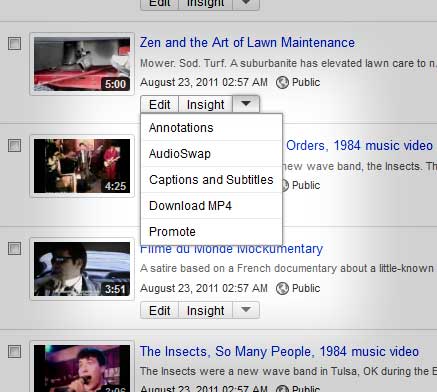
click to enlargeIf you’ve been asked to provide files in this format and thought you could – check this screenshot out:

If you have a video on You Tube, then you can easily download a copy of your clip in MP4 format. No matter what you may have uploaded originally- You Tube converts everything to MP4!

Just log into your account and click the link to your videos (upper right-hand corner). Now expand the arrow beside Insight and you should see a “Download MP4” link. Click it and forget it!

Help for Facebook Pages

It’s about time.

Ever since I started using Facebook the interface for Pages has mystified me. Specifically, why can’t I (as in me) post a message on the Page that I created? Facebook only lets me post as the page.

If you’re not familiar here’s a dime store rundown- the feature known as Pages are Facebook’s answer to a business presence. The main idea is people have friends and pages have fans. It might be a pizza shop or a website or a local restaurant. If you’re wanting people on Facebook to follow the exploits of your entity you need to create a Page.

But when you create a page for your business you’ll suddenly learn that you can only interact with people on that page as the business. This applies to anyone who either creates or is assigned as an administrator to a page. In other words, you can’t be… well, you.

Until now.

Facebook has recently rolled out an upgrade to pages. Allowing you to be you is only one small part of this upgrade- in fact it’s barely touched on in their little tour. And like many Facebook features it’s harder than hell to find. Here’s how…

My (New) Settings
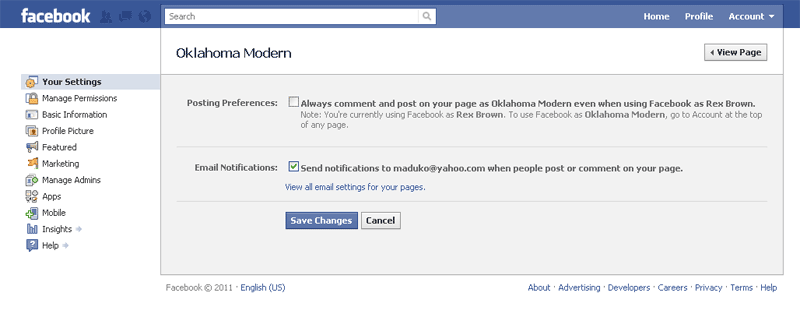
As an example let’s say I have a page for a blog called Oklahoma Modern. If I visit the upgraded Facebook page I created for this fun and fascinating blog I’ll see an Edit Page link along the right-hand side. Click on Edit Page, then click on Your Settings and it should look like this (click to enlarge):

My Recommendation
Uncheck the top box so you can be you when you visit this page. Now if I post a comment on Oklahoma Modern the post will be from Rex Brown- not Oklahoma Modern.

Say what?

What if I do want to post something as Oklahoma Modern?

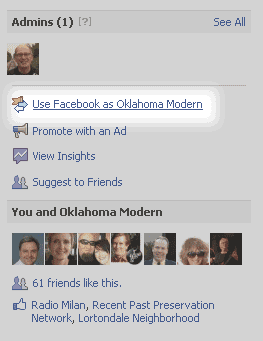
No problem. The upgraded interface has a nifty option along the right-hand side that says “Use Facebook as Oklahoma Modern.” If I click that link my actions will be posted from Oklahoma Modern instead of Rex Brown. You’ll also find a similar link under Account dropdown.

The cool/scary part is that applies to any of your activity on Facebook- not just interactions on your own pages. So be careful!

As always, your mileage may vary.