How Your Images Can Attract a Crowd
Getting more people to visit your website or blog is a universal goal for most anyone. I mean, anyone that has a website or blog. Once you scrape the surface of that topic you will immediately run into the phrase Search Engine Optimization, or SEO.
SEO is simply making your pages and content as friendly as possible to search engines like Bling and Google. The ins and outs of SEO are complicated. There are tons of books written on the subject and I have no intention of delving into the complexities of all that. But one little snippet I recently discovered is worth sharing.
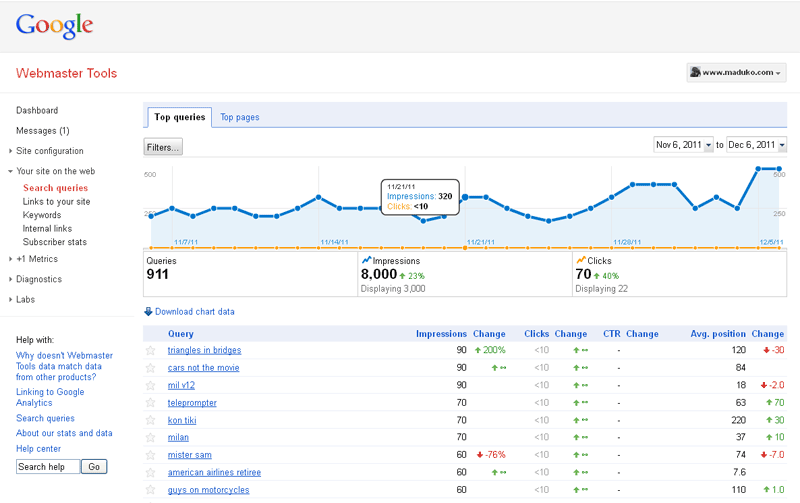
 If you’re working on increasing traffic to your site you’re probably familiar with Google’s Webmaster Tools. If you aren’t you probably should be. Google’s toolbox allows you to see how the search engine is indexing your site (or not) and report on how your site fares in particular search results. The main page (right) display the performance of your site based on how many searches your site showed up on. The values are given as Impressions (showed up on the search results) and Clicks (someone actually clicked to visit your site).
A couple of weeks ago I happened to notice that little button on the left of the graph that says Filters.
Filters allow you to zero in on certain types of searches- mobile, image, web, etc. I was amazed to learn that the majority of search traffic being reported was from image searches. When I filtered the graph to display web searches the numbers plummeted. I was reduced from thousands of search hits to a handful.
Obviously your mileage will vary. If your site has more images you will probably see more search traffic from images searches. This can also increase by optimizing your images. Many bloggers overlook this simple but effective step- here’s how to do it…
- Name Your Image
Don’t use the lame file name your camera coughs up. Nobody will be excited by DSC00913.jpg (well, not many people anyway). But if you named it las-vegas-casino.jpg it will have much more relevance.Try to use simple words and avoid using slashes, dots or spaces.
- Keep It Relevant
Speaking of relevance- make sure the image name matches the content where it appears. Consider our above example: If your blog is about a cool casino you discovered in Las Vegas, you’re done.However, let’s say you’re writing about data backup and using a casino image to illustrate gambling with your precious data (okay, you pick the examples next time). In this case a better file name would be best-bet-backup.jpg or backup-gambler.jpg.
- The ALT & Title Tags
The HTML lingo that runs the web has a couple of image-specific tags to help with this endeavor. Most people will be familiar with these tags as “hover text.” If you hold your cursor over my screenshot above you should see “Webmaster Tools by Google” pop up. That happens because I defined the ALT tag for the image and the TITLE tag for the hyperlink.The instructions for adding these vary wildly depending on your blogging platform or content management system. WordPress makes it very easy, but Blogger makes you dip into the HTML view.
Any or all of these suggestions will make your images more friendly to the robots that constantly troll the Web on behalf of search engines. Once they find and index them you should see an increase in visits to your site from image searches. Then all we have to do is entice those visitors to stay for a while.
But that’s a story for another day.
 Last week we considered the world as related to us by searches on Google. They even produced a video called Zeitgeist 2011. Well this week I want to share an excerpt from another press release looking back on 2011. This time from eBay: